
Comping on Facebook (Part 2)
Finding comps on Facebook
Personally, I find the Facebook ‘Search’ mechanism really difficult to use – you can easily search for people, groups or brands using the main Search box at the top of the page, but searching status updates rarely results in anything useful. Instead, I recommend ‘Liking’ as many brands as you can, and regularly checking your News Feed for updates from compers and companies.
- If you regularly read magazines, browse through and do a search on Facebook for the brands that you like – for example, cooking, fashion or home magazines will have details of many companies with fan pages. ‘Like’ the pages and have a browse down the Wall and across the ‘Tabs’ to see if there are any current giveaways.
- Be nosey and have a good look at your comping friends’ walls to see which brands they like and where they’ve been ‘Liking’ or Commenting… then follow the links to the comps!
- Read your ‘junk’ emails – scroll to the bottom of most of them to find a Facebook icon, which will link to their fan page – often they’ll be running comps there.
- Use the search mechanism to look for ‘Facebook’ on sites like The Prizefinder
- Search on Twitter for ‘Facebook win competition’ – luckily US brands use the term ‘contest’ or ‘sweepstakes’ instead of ‘competition’ so the majority of results will be UK comps.
- Using the Promotions HQ App, you can search for comps run on the Wildfire platform – use ‘UK’ in the search box.
How (not) to annoy your friends
I have around 900 Facebook friends now and around 70% of those are compers. People tell me they have set up separate profiles for comping so they don’t annoy their ‘real’ friends, but personally I can’t see the benefit of this – it’s far too confusing, and it’s also against Facebook rules to have multiple accounts! Right now I’m logged in to Facebook and so are 34 of my friends – of these, only 4 of them are non-comping friends. Unless your friends are logged in they will not see your updates in their live Newsfeed, so why worry about it? If they’re good friends then I’m sure they know about your comping hobby and won’t mind – and if it does annoy them they always have the option to remove your updates from their Newsfeed. A useful feature is Facebook Lists where you can distinguish between your comping friends and other friends by adding them to separate ‘Lists’ – to do this choose ‘Edit Friends’ from the Account Menu (top right of your Facebook window) – you can click on ‘Create a List’ and add friends to it. You will then have the option to view a Newsfeed of just your friends, or just compers – the screenshot below shows the 4 lists that I have set up (you can add friends to as many lists as you like – I have several comping mum friends!)
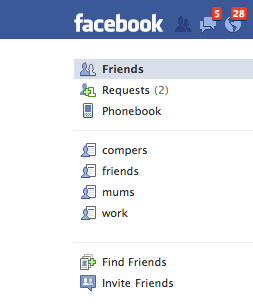
When entering competitions on Facebook, try to avoid posting competitions on others’ walls, too – it’s better to post it (or ‘Share’) on your own wall, and do be aware that using the Pop-up chat windows to ask friends for votes can be considered annoying and intrusive. Promoters seem to like photo tagging competitions because it’s an easy way for them to get a photo (essentially an advert for them!) posted on multiple walls, but in reality they’re an impractical promotional tool because Facebook will only allow 60 tags on one photo, so often promoters will have to keep adding the same photo to their album or ask you to add a comment to say ‘Tag’ underneath the photo. You might also find your friends tagging you in competition photos, resulting in the photos appearing on your Wall – this can be irritating. There’s a great article on Facebook Privacy Settings at Allfacebook which can help you cut down on unwanted tagging or stop certain people from posting on your wall. Don’t forget you can delete posts from your own Wall too – but remember they will already have appeared in the live Newsfeed that your friends see.
Facebook v Twitter
I enter competitions on Facebook and Twitter, and both of them have their advantages. With Facebook the prizes are bigger and better, and the competitions more interesting, but if you’re on Twitter all day and are quick at typing, you have a great advantage as so many comps have a short timespan. If you want to remind yourself to enter a competition later on, with Twitter you can quickly and easily add a Tweet to your favourites, but unfortunately there’s no way of bookmarking a post (yet!) on a Facebook newsfeed. I usually take an iPhone screengrab to remind me to enter when I’m back at my desktop Mac! Twitter competitions are easier to find, but because of that there will be more entries – it’s also easy to know you’ve won on Twitter as you’ll see a tweet or DM mentioning your name. On Facebook you have to hope that the promoter will send you a message to let you know you’ve won – or if you’ve missed a status update announcing you as the winner, that one of your friends will see it and let you know!
Comping on Facebook is still a relatively new thing and from my own searches I know there’s little guidance online, so if you have other suggestions on how to comp successfully on Facebook, I would love your feedback!


